 Follow Up Bot
Blog · 12 October 2026 · Slack Connect
SLA breach: what it is, how it is calculated and how to avoid one
An SLA breach is a missed service commitment. See breach time worked out, an uptime table, Excel formulas, a prevention checklist and what to do next.
By The Follow Up Bot team
Customers in a shared channel seldom say when they feel ignored. They wait, then quietly take their questions somewhere else. If your team supports customers in Slack Connect channels, a missed response target is a common SLA breach, and it is also one of the easiest to prevent.
Last checked: October 2026.
What is an SLA breach?
An SLA breach is when a provider fails to meet a measurable commitment in a service level agreement, such as a response time, resolution time or uptime target. SLA targets are concrete and measurable, for example 99.9% uptime or a first response within 24 hours.
A warning fires before the target, and a breach is recorded once the target passes. In this guide, a near miss is a target met by a thin margin, such as a reply at minute twenty-nine of a thirty-minute target. This is our own working definition, not a standard term. It is not a breach, but it tells you the process is one busy afternoon away from one.
Common types of SLA breach, with numbers
Most breaches fall into four groups. The figures below are our own arithmetic, so you can check them yourself.
Uptime and availability
Take 99.9% uptime, one of Atlassian's example SLA targets. An uptime target converts directly into allowed downtime: minutes in the period multiplied by (1 minus the uptime target). A 30-day month has 43,200 minutes, so 99.9% allows 43,200 x 0.001, or 43.2 minutes. On a 30.4-day average month (43,776 minutes) the same target allows about 43.8 minutes.
Atlassian gives an example of a host that promises 99.95% uptime and issues a service credit when a month falls below it. Whether a given outage counts depends on how your contract defines downtime.
| Uptime target | Downtime per month | Downtime per year |
|---|---|---|
| 99% | 7 hours 12 minutes | 3 days 15 hours 36 minutes |
| 99.5% | 3 hours 36 minutes | 1 day 19 hours 48 minutes |
| 99.9% | 43.2 minutes (about 43.8 on a 30.4-day average month) | 8 hours 45.6 minutes |
| 99.95% | 21.6 minutes | 4 hours 22.8 minutes |
| 99.99% | 4.3 minutes | 52.6 minutes |
Response time
A response breach happens when the first reply comes after the target. Say a critical issue has a 1-hour response target and the first reply arrives after 2 hours. The breach is 120 minus 60, or 60 minutes. The customer notices the silence long before anyone records the number.
Resolution time
A resolution breach is a fix that takes longer than the target for its priority. Atlassian's guide gives resolving critical incidents within four hours as an example of a measurable target. If the fix lands at five hours, the breach is one hour.
Security and data protection obligations
Some agreements also commit the provider to security controls or notification windows. Missing those is a contract breach. A personal data breach is a different matter with its own legal rules, covered in SLA breach vs data breach notification below.
How breach time is calculated
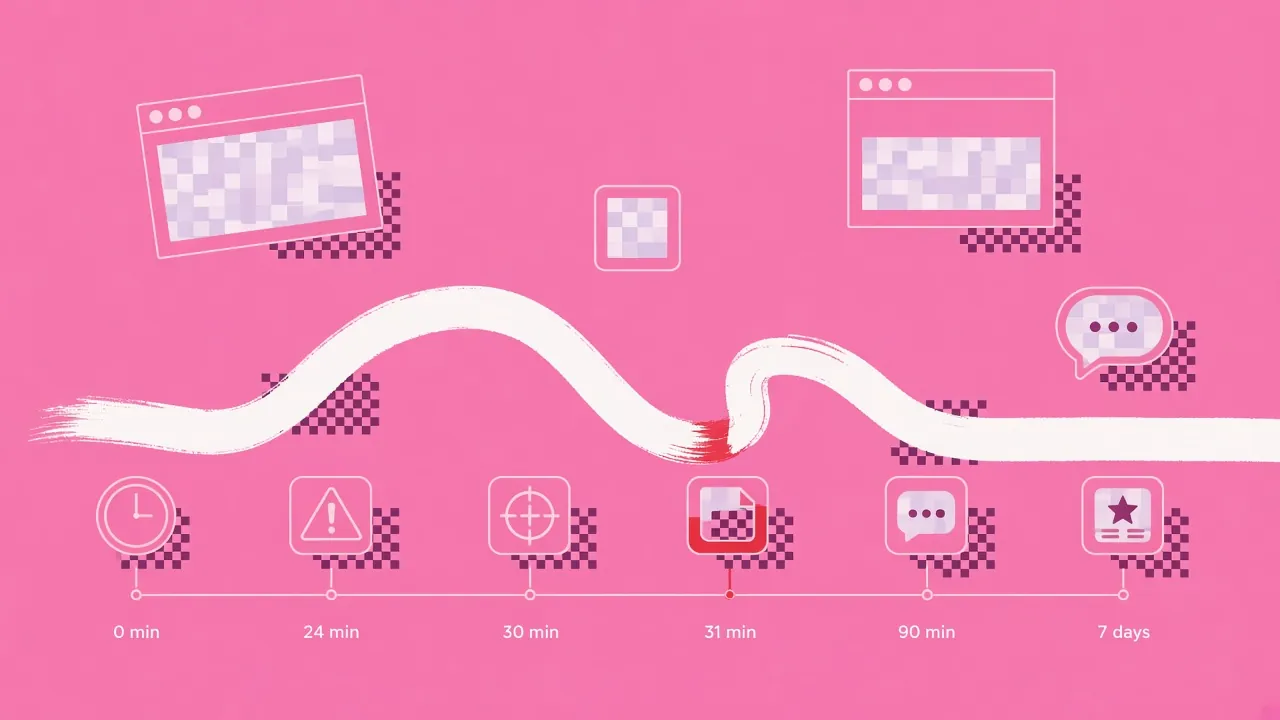
Target time, elapsed time and breach time
Three terms do the work. Target time is the limit the clock must not pass. Elapsed time is the business time used, minus any paused time. Breach time is elapsed time minus target time, and it only exists when the result is positive.
How business-hours schedules and pause conditions move the clock
Helpdesks let you pick calendar hours or business hours for each priority. With business hours, nights and weekends do not count. Some clocks also pause while a ticket is On-hold or Pending, so time spent waiting on the customer is not charged to you. Your contract decides which of these apply.
Worked example: a 30-minute response target in business hours
A customer posts on Friday at 16:50. Business hours end at 17:00 and restart on Monday at 09:00. The target is 30 minutes on a business-hours clock, and the first reply goes out Monday at 09:15. Elapsed business time is 10 minutes on Friday plus 15 minutes on Monday, which is 25 minutes. That is under 30, so there is no breach. A 24x7 clock would count 64 hours 25 minutes for the same message, and 64 hours 25 minutes minus the 30-minute target is a breach of 63 hours 55 minutes.
The calculator below is the interactive version of the Excel formulas further down.
SLA breach time calculator
Enter your target and the business minutes that actually elapsed. Paused time is subtracted before checking.
- Counted time
- minutes
- Breach time
- minutes
- Share of target used
- %
A share above 100% means the SLA is breached. Check your own contract for how it rounds and what it pauses.
Excel formula for breach time
Lay out one row per message, with your target in minutes in a single cell so every row uses the same one:
| Cell | Holds | Formula |
|---|---|---|
| H1 | Target in minutes | a number, such as 30 |
| A2 | Start time (the customer's message) | a date and time |
| B2 | End time (the first reply) | a date and time |
| C2 | Paused minutes | a number, 0 if none |
| D2 | Elapsed minutes, net of pauses | =(B2-A2)*1440-C2 |
| E2 | Breach flag | =IF(D2>$H$1,"Breached","Met") |
| F2 | Breach minutes | =MAX(0,D2-$H$1) |
The core of it is =(B2-A2)*1440, which turns the gap between two times into minutes. Use an absolute reference such as $H$1 so the target stays fixed when you copy the formulas down the column.
For whole working days, NETWORKDAYS.INTL returns the number of whole workdays between two dates and skips the weekend days and holidays you give it. A typical call is =NETWORKDAYS.INTL(A2,B2,1,J2:J20), where 1 means Saturday and Sunday are the weekend and J2:J20 holds holiday dates.
Partial days need a helper column. Add the minutes between the start time and closing time on the first day, and the minutes between opening time and the end time on the last day. For each full working day between them, add the length of your working day in minutes.
What causes SLA breaches and what they cost
Common causes
Breaches tend to trace back to a short list of causes:
- Unclear ownership, so everyone assumes someone else replied.
- Technical failure, such as an outage or a broken integration.
- Human error, such as a message read on mobile and forgotten.
- External events, such as a supplier incident or a public holiday.
- Overpromised targets that the team could never meet.
Consequences: service credits, penalties, termination rights, lost trust
An SLA also sets out the remedies when targets are missed, such as service credits or an escalation path. Predefined consequences give customers recourse, whether that is credits, refunds or other compensation. Some contracts also give the customer the right to terminate after repeated breaches. Exact remedies differ from contract to contract, so read yours.
The cost that no contract lists is trust. Customers in shared channels rarely complain about a slow reply; they just stop asking.
How helpdesks track SLA breaches
Helpdesks measure each ticket against a policy. In Zendesk, first reply time runs from ticket creation to the first public agent comment. Targets can use calendar or business hours, and some metrics pause while a ticket is On-hold or Pending. The target status shows the metric closest to breaching, so agents can work the most urgent ticket first.
ServiceNow and Jira Service Management also record breaches against their own SLA records. Their documentation explains how each one defines a breach.
How to avoid an SLA breach
Prevention checklist
- Set targets your team can actually meet, not ones that look good on a contract.
- Alert before the target passes, not after.
- Name an owner or an on-call group for every channel.
- Review the SLA regularly against how fast you really respond.
- Train new people on the targets and the escalation path.
- Keep a contingency plan for absences and holidays.
Catching response-time breaches in Slack Connect channels
A customer message in a shared channel is easy to miss. It sits between internal chatter, and nobody is formally assigned to it. A clock that nobody watches is how a half-hour target becomes a two-hour gap.
Follow Up Bot handles this part. You set a response target and choose who gets alerted, whether that is a person or an on-call group. Here is how it works:
- When a customer message waits longer than your target, it sends one quiet alert to an internal channel.
- A reply, a thread answer or a reaction from anyone on your team stops the clock.
- If nobody picks it up, it sends one escalation to a second channel, such as the one your team leads watch, after a wait you choose. Nobody gets more than two nudges.
- The customer never sees the bot, and it doesn't see or store message contents.
The alert fires when the target you set in the bot passes, so our suggestion is to set it shorter than the one in your contract. With a thirty-minute SLA, a bot target of twenty-four minutes matches the warning point in the lifecycle above and leaves the owner six minutes to reply before anything is breached. Tune the gap to how quickly your team can act.
A breach you hear about from the customer is one your alerts should have caught first.
If you run alerts by hand instead, here is a message you can adapt for your internal channel:
:warning: No reply yet in #acme-sharedA customer message has had no reply for 24 minutes: <link to message>Contract target: 30 minutes, business hoursOwner: @support-oncallPlease reply, react or answer in the thread before the target passes.Our guide to escalation management covers who should receive the escalation and when. If you only need a manual fallback, you can schedule a message in Slack as a personal reminder.
Add Follow Up Bot to Slack and try it free for seven days, no card needed. You pay one flat price per workspace rather than per seat, and Enterprise Connect, the plan that covers unlimited Slack Connect channels, costs $990 a year.
Follow Up Bot is an alert, not a helpdesk. If you need tickets, queues and reporting, a helpdesk is the better choice. See our Thena alternatives comparison for how the options differ.
What to do when a breach happens
Provider playbook: first hour, root cause, credit
- First hour: reply to the customer, name the owner and confirm what you are doing.
- Root cause: find out whether it was ownership, capacity, a missed alert or a wrong target.
- Credit: check what the contract says about credits and apply them without waiting to be asked.
Here is an update you can adapt:
Hi @Dana, sorry for the wait on your question from 10:15.We missed our 30-minute response target. @Sam now owns this and will update you by 11:30.We are adding an alert so this does not repeat.Customer side: how to prove a breach and claim credits
Keep timestamps and screenshots of the channel showing your message and the first reply. Then check your contract for any claim window and the evidence it asks for. If a channel was silent because an invite failed, the team may not have seen your message at all. Our guide to why a Slack Connect invitation fails to accept explains how that happens.
Common exclusions: maintenance windows and force majeure
Agreements often carve out exclusions, commonly scheduled maintenance and events outside the provider's control. Read the exclusions clause before you claim, because it can remove a breach that looks clear.
SLA breach vs data breach notification
An SLA breach is a missed contract commitment. A data breach is a security incident with legal notification duties. Under GDPR Article 33, a controller must notify the supervisory authority without undue delay and, where feasible, not later than 72 hours after becoming aware of a personal data breach. Checked October 2026.
Your contract may also set its own window for telling customers. This is not legal advice, so ask a lawyer about your situation.
Related terms and the three types of SLA
SLA breach vs violation, near miss and warning
In this guide, violation is another word for breach. A warning is an alert, something that fires before the target so someone can still act. A near miss is an outcome: the target was met, but only by a thin margin.
SLA vs OLA vs underpinning contract
| Term | Between | What it covers |
|---|---|---|
| SLA | Provider and customer | Service targets the customer is promised |
| OLA | Teams inside one company | What each internal team commits to so the SLA can be met |
| Underpinning contract | Provider and outside supplier | Supplier commitments that support the SLA |
Customer-based, service-based and multi-level SLAs
A customer-based SLA covers one customer across all the services they use. A service-based SLA covers one service for every customer. A multi-level SLA combines corporate, customer and service layers. Incident SLAs sit inside these and set response and resolution targets by priority.
FAQ
SLA breach FAQ
What is an SLA breach?
An SLA breach is when a provider fails to meet a measurable commitment in a service level agreement, such as a response time, resolution time or uptime target.
What is SLA breach time?
Breach time is how long past the target a response or fix took, after business hours and paused time are applied. A 30-minute target answered at 45 counted minutes is 15 minutes of breach time.
How do I calculate SLA breach in Excel?
Subtract start from end and multiply by 1440 for minutes, subtract paused time, then use MAX(0, elapsed - target) for breach minutes.
How do helpdesks track SLA breaches?
They time each ticket against its target, usually in business hours, pause some clocks while a ticket waits on the customer, and flag the target closest to breaching.
How do I avoid an SLA breach?
Set targets you can meet, alert a named owner before the target passes, review the SLA regularly and keep a contingency plan for absences.
What are the three types of SLA?
Customer-based SLAs cover one customer, service-based SLAs cover one service for all customers, and multi-level SLAs combine corporate, customer and service layers.
What is SLA incident management?
It is managing incidents against response and resolution targets set by priority, so the most urgent issues get the fastest clocks.
What is the SLA for reporting a data breach?
That is a legal question, not an SLA one. Under GDPR, the supervisory authority generally must be notified within 72 hours of becoming aware where feasible, and your contract may set its own customer window.
Start small. Pick your busiest customer channel, set a response target a few minutes inside your contract, and send alerts to one internal channel such as #customer-alerts. If you are new to shared channels, start with how Slack Connect works.
Tags: sla breach, sla, response time, slack connect, customer support in slack